Hi,
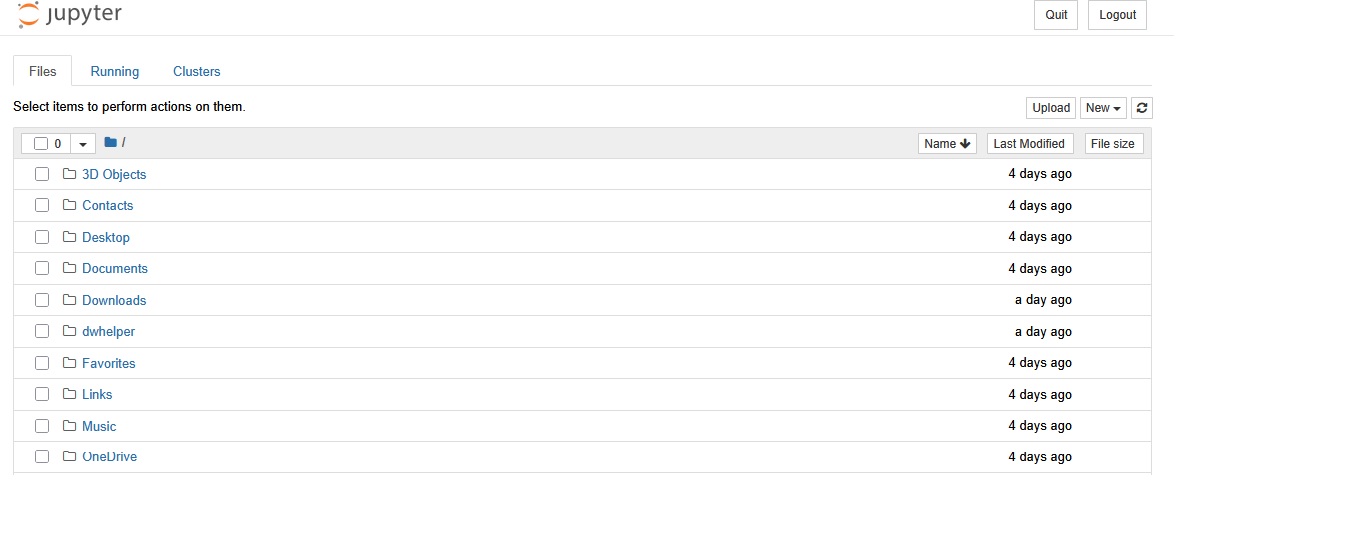
I’ve installed Jupyter Notebook on my Windows 10 laptop. The problem is there’s no tabs such as File, Edit, View and so on as usual. My screenshot is attached. What’s wrong with it?
First, you seem to be using an older version. (Or possible NbClassic?) Just pointing this out so you know and aren’t comparing things to those running current tech.
Second, you are looking at a list of directories in the view in the screenshot. You would need to click on ‘New’ in the upper right side and start a notebook. Then the window context will (or should) change to the notebook editing interface with familiar File , Edit, & View toolbar you are expecting.
Thanks. By clicking on File → Open I get this error:
Firefox can’t establish a connection to the server at localhost:8888.
Any thoughts about it?
That seems to be a network/connection issue. Did you try rebooting and restarting Jupyter from square one?
It doesn’t work even with a new start. It reports Python doesn’t respond correctly.
Okay, then that requires reassessing from the start as your first post was simply about the interface looking different than you expected.
Did you try installing in ways recommended in 2025 for Windows 10 machines? My concern is you are already facing an uphill battle with trying to install things on this old system. On a newer system I would recommend installing JupyterLab Desktop as it supposed to be, “the quickest and easiest way to get started with Jupyter notebooks on your personal computer.” Failing that, I’d recommend trying to install the Anaconda Distribution. That will include Jupyter along with helpful things like Python that should work in conjunction with it.
Keep in mind that I was concerned about your ‘installed’ version looking old.
The problem with your post as it is that you have share very little information. Your comment, “It reports Python doesn’t respond correctly”, is rather vague. I would recommend seeing Getting good answers to your questions and looking at other posts with similar issues to get a better idea of what to try and what you may want to provide as you try things going forward.