import ipywidgets as widgets
from IPython.display import display, clear_output
import pandas as pd
Create a button and an output area
button = widgets.Button(description=“Click Me”)
out = widgets.Output()
Define the function to run on click
def on_button_clicked(b):
with out:
clear_output()
data = {‘Name’: [‘Tom’, ‘Nick’, ‘Krish’, ‘Jack’], ‘Age’: [20, 21, 19, 18]}
df = pd.DataFrame(data)
#print(df)
Link the function to the button
button.on_click(on_button_clicked)
Display the button and output
display(widgets.VBox([button, out]))
Is it possible to use just “df” instead of “print(df)” on button click? just like pandas dataframe supports both “df” and “print(df)”
You are looking for display(). That is generally the keyword for rendering rich display things in Jupyter. For example if you put df in a cell below your code and ran it, you’d get the equivalent of the display(df) without needing to type it. This is because the last expression in a cell is special and Jupyter tries to render in the rich manner appointed.
You can see here and the links therein for more what is behind this. Or here for a somewhat similar issue.
One way to think about it is the print() would be for dataframes in a console or terminal, and display() would be for them in Jupyter.
And you shouldn’t need to import it, in modern Jupyter.
Those changes implemented in your code (& FORMATTED for posting, see below):
import ipywidgets as widgets
from IPython.display import clear_output # no need to import `display` usually, in general
import pandas as pd

#Create a button and an output area
button = widgets.Button(description='Click Me')
out = widgets.Output()

#Define the function to run on click
def on_button_clicked(b):
    with out:
        clear_output()
        data = {'Name': ['Tom', 'Nick', 'Krish', 'Jack'], 'Age': [20, 21, 19, 18]}
        df = pd.DataFrame(data)
        display(df)

#Link the function to the button
button.on_click(on_button_clicked)

#Display the button and output
display(widgets.VBox([button, out]))
Minor:
Note how my code maintained the different levels of indenting in the post that you had now shared with us.
Please, learn about how to post code at such sites as this in useable form. To help you with that see about ‘block code formatting’ here. (Or see about ‘fenced code blocks’ here. They are both the same thing if you look into the details.).
Previously, I suggested you read Getting good answers to your questions , emphasizing the section entitled ‘Help others reproduce the problem’. Helping those trying to help you is what that section is about and formatting code correctly will help with that. As I said earlier, you can use GitHub gists to share notebook so you don’t have to copy/re-type all the code in your post, too. That way if you just want to post the key part , and not even format it, the person trying to help you can at least look at the notebook and get the formatted code.
I am trying to display buckaroo rendered dataframe on button click and it supports only df display not print(df) nor display (df). Apologies for asking question in wrong way next time will surely follow the rules.
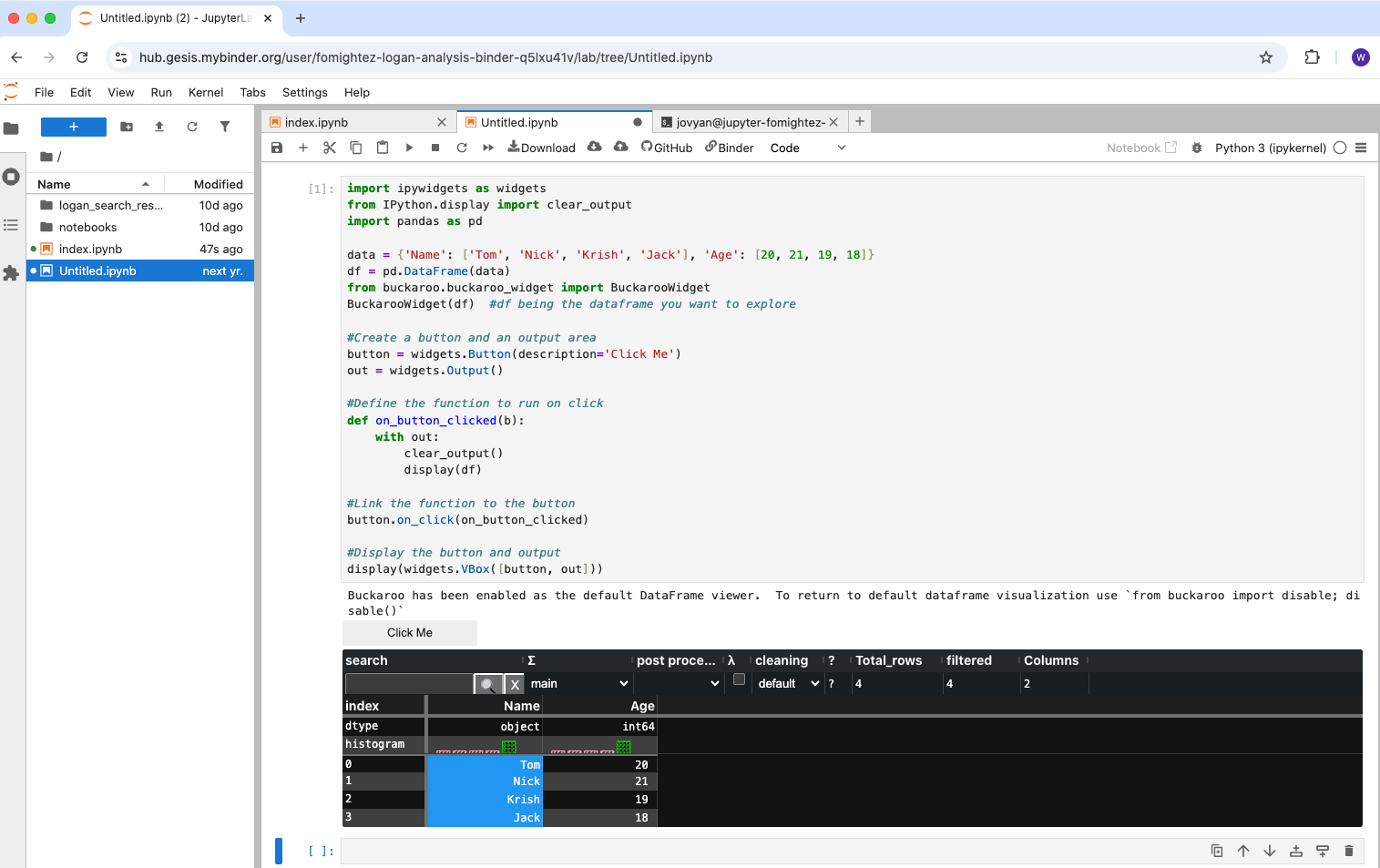
Now sure what you mean? Buckaroo works with display(df). This is after I click the button:
Code run there:
import ipywidgets as widgets
from IPython.display import clear_output
import pandas as pd

data = {'Name': ['Tom', 'Nick', 'Krish', 'Jack'], 'Age': [20, 21, 19, 18]}
df = pd.DataFrame(data)
from buckaroo.buckaroo_widget import BuckarooWidget
BuckarooWidget(df)  #df being the dataframe you want to explore

#Create a button and an output area
button = widgets.Button(description='Click Me')
out = widgets.Output()

#Define the function to run on click
def on_button_clicked(b):
    with out:
        clear_output()
        display(df)

#Link the function to the button
button.on_click(on_button_clicked)

#Display the button and output
display(widgets.VBox([button, out]))
Before I click the button, just the status of the default viewer was showing, along with the button.
The additional buckaroo lines come from the documentation ‘Using Buckaroo: In a Jupyter Lab notebook cell’.
It looks like issue for me.Buckaroo rendering will replace the pandas dataframe but here it displays both. Screen Recording 2025 09 16 000035 Displaying both is like what pyscript does.
Please never just share the video. I understand here you thought it was useful to share the behavior and in this case it was useful for that; however, you should share your code you are running, too.
You aren’t running the code I gave you. If you shared the code block you actually ran, you may have noticed that you weren’t using my code.
Part of all the suggestions of these guides to how to post is that if you follow the process, often you’ll troubleshoot it yourself before you hit send on the post.
The code you are running looks like this:
#Define the function to run on click
def on_button_clicked(b):
    with out:
        clear_output()
        display(df)
        print(df)
You have both display(df) AND print(df).
So it shows the print() version below the buckaroo rendering