Is it possible to deploy jupyter Notebook python console on browser using binder or using GitHub?
I don’t think you can launch direct to a console via MyBinder URL. I’m surprised, but I couldn’t come up with a combination to get to that endpoint. You can always launch direct to a JupyterLab interface with a notebook open and then using the content in markdown in that notebook, guide the user step-by-step how to get the console. (I wonder if there is some trick with ipylab to do it via a click or button? But I couldn’t come up with the route yet.)
(The ipdb console is similar, see here, and so you could have triggering that in a notebook that lunches via MyBinder. However, it is probably more complex than you’d want to present to users for an interface. So I only mention it as an aside.)
PythonAnywhere offers something more along the lines of what I think you want:
You can point PythonAnywhere at a gist and get a console that runs that code.
Example:
Click here to see code run and get a session where you can continue to query it. After it runs, I suggest typing %whos at the prompt on the console and you can see what variables are active and defined.
Of course the user can continue to type whatever they want in the ipython console, too.
See the ’ Create your own Gist Console’ on the left side pane by scrolling down for more about it. You are looking for the text ‘Create a console for a different gist >>’ that will lead you here.
The gist I pointed the creator at is this one.
JupyterLite does have a direct to REPL option.
Example:
https://jupyterlite.github.io/demo/repl/index.html?kernel=python
Put that in your browser’s URL address bar and you’ll get one.
See more about it here.
Since GitHub can launch JupyterLite sessions, you can host it under your own repo and have more control. See here.
https://jupyterlite.github.io/demo/repl/index.html?kernel=python
This link does not run python code. I am able to write python code. I even tried
“jupyter nbconvert --to html Untitled71.ipynb --output index.html”
but it gives me the following error.
“JupyterLite requires JavaScript to be enabled in your browser.”
My javaScript is enabled but it still shows the error.
I am not sure of the image icon I got?

That link https://jupyterlite.github.io/demo/repl/index.html?kernel=python works with a pyodide kernel as this screenshot shows:
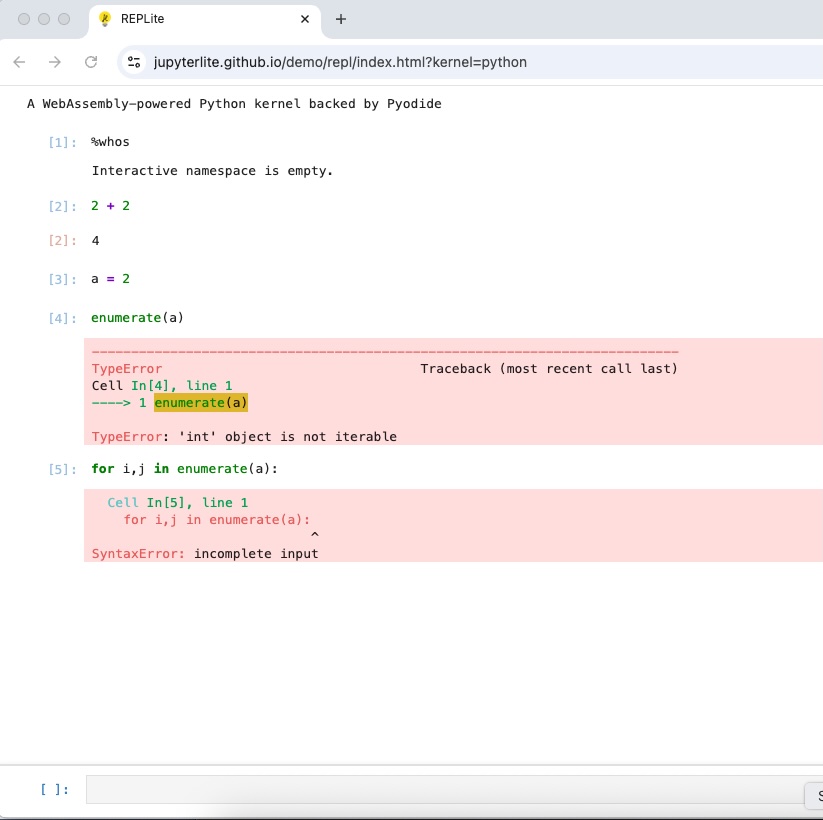
Pyodide kernel is one of the Web Assembly based Python kernel.
The JupyterLite documentation has more information.
The first two tiles at Try Jupyter use it, too. You may have better luck with those?
jupyter nbconvert --to html Untitled71.ipynb --output index.html” is not Python code. That is a jupyter nbconvert command that is command line-based command. You asked about a Python console. Not about running commands.
You could run jupyter nbconvert --to html Untitled71.ipynb --output index.html” from MyBinder by making a repo, and putting a notebook in it with that as a cell with an exclmation point in front of the command. Then you can use MyBinder directly launch the notebook with that content and the user can run it.
However, please try to keep to the thread topic that you posted about and don’t take things to an unrelated discussion.
How did you make the python code run?Enter takes me to next line and I tried control enter even it didn’t run the code.
On my machine in Chrome, it is like entering code in a Jupyter cell where I use shift+Enter to execute it.
“shift+Enter” worked. Adding a run button would be better I feel becz I am not sure of “shift+Enter” working for mobile.
Much of JupyterLite is active development as it is relatively nascent given Jupyter Notebook in general. You should look in the JupyterLite GitHub repo and see if others have filed an issue about this. If not, you can file a feature request there so the developers will see it. Better yet as it is open source, you can even take the next step add the feature and make a pull request. I’d start with engaging the developers with an issue request though as there may be a way to already have that but the demo doesn’t feature it. Or at least not that one.
There’s options
I did try point out that it was a starting point and could be customized.
In that vein (or maybe parallel) the Sympy Online shell example belongs in this conversation anyway, especially since you aren’t happy with the UI.
I think the Sympy Online shell pre-dates the repl I pointed you at; however, it is using JupyterLite.
The repo is here.
To see it in action…
To try it go to the main Sympy page here. Then on the navigation banner across the top choose ‘Online Shell.’
(Be patient, and don’t be surprised if it takes a couple of tries for it to be read to enter code. My first access of it today with a direct URL, it didn’t like (hung on busy at starting up), but then I went to the SymPy page and through and then was patient. After initializing, it should it was read via the kernel status indicator in the upper right.)
Now you can enter Python code. (It already has SciPy loaded so you can use that package, which is the focus, but Python will work, too.)
Importantly, you’ll see that one can use Enter alone to run code. So either it is based off a slightly different model, or they customized it. (Oh here it says it is customized from the main REPL of the jupyterlite/demo, so I think it is presently based on what I pointed you at earlier and so you can clearly see from this more advanced example you can customize it.) The code is at the repo so you can modify it.
It is though JupyterLite powered. They even feature the logo in the upper right of the Shell.
I have many python consoles deployed in my GitHub using pyscript.I am exploring more on a way we can deploy the python console of Jupyter Notebook on browser.
I am new to Github.How can I add the feature and make a pull request?
Largely, that is beyond the scope of this forum. I can offer some ideas on how would want to proceed to start to work the git/GitHub involved-part of that.
GitHub is just one on of the central git-users hubs. GitLab is another.
You would need to learn about git use first to fork & pull the current development state, make a branch, and implement your update. (If you don’t yet know how to approach implementing such an update to the code, then you wouldn’t pursue that avenue.)
Once you have implemented it on your fork, then you make a pull request from your fork. These days GitHub prompts you on how to do that when you use the web interface to check when you pushed updates to your fork/branch.
Having said all that. Start small learning git and doing things in your own repositories. There’s a lot of guides out there to help you learn how to use git.
When you are ready to contribute to open source projects start with filing an issue and propose how you would fix it. Documentation issues are often a good start. Usually the other developers/maintainers will then chime in on the issue and if you ask about how to best handle pushing the change, they’ll usualy tell you how to they’d like you to proceed. Some repos/communities will even label issues as ‘good first issue’ to help make it easier to onboard new contributors.(See here for example where it says, “This should be an easy fix, suitable for beginners”.)
If it was a small thing and you knew how to change it, you could jump to a pull request to start the dialog, but it sounds like you aren’t there.
To get started, besides learning git on your machine and in conjunction with GitHub of your own repos, you can look at other past closed issues and pull requests and see how the developers in that community like things done.
In short, for now stick with bringing things up in projects as ‘issues’ posts on GitHub; however, be prepared to not get much traction unless it is a critical thing you find first or you can offer a solution. For now, even if all you offer is an idea or small code change as an example code block, it is better than nothing and if it’s straightforward, the developers/maintainers may be prepared to incorporate it and it would be convenient for them as they are actively developing on the project already.
Can someone from the community give me a video call to guide me with all of this?